


Still downloading, printing, signing, scanning, and re-uploading documents?
In 2026, that workflow isn’t just outdated—it’s slowing you down.
Whether you’re closing deals, onboarding employees, or managing agreements remotely, speed and convenience matter more than ever.
That’s why modern businesses and individuals are switching to smarter, faster solutions: electronic signatures.
Meet SignPe — The Smarter Way to Sign Documents
SignPe is a powerful, easy-to-use e-signature platform that lets you sign, send, and manage documents online in minutes—without changing formats or downloading files.
From PDFs and Word documents to images like PNG, SignPe works seamlessly across all formats, helping you get documents signed faster than ever.
Why Choose SignPe in 2026?
1. Sign Documents Instantly
With SignPe, you can sign documents directly from your browser or mobile device.
- Upload or access files from cloud storage like Google Drive
- Sign using typed, drawn, or uploaded signatures
- Works across PDF, Word, PNG, and more
No printing. No scanning. No delays.
2. Simplified Collaboration & Multi-Party Signing
Need signatures from multiple people? SignPe makes it effortless.
- Add multiple signers with email invites
- Set signing order and roles
- Track progress in real time
- Send automated reminders
Whether your team is in one office or across the globe, everyone can sign quickly and securely.
3. Enterprise-Grade Security & Legal Compliance
Your documents are protected at every step.
- End-to-end encryption
- Detailed audit trails (who signed, when, and where)
- Tamper-proof records
- Compliance with global e-signature laws (ESIGN, eIDAS, and regional regulations)
SignPe ensures your signatures are legally valid and fully secure.
4. Real-Time Tracking & Audit Trail
Never lose track of your documents again.
- Monitor document status in real time
- Get notified when documents are opened or signed
- Maintain a complete audit history for compliance
Perfect for legal, HR, and business-critical workflows.
5. Create, Edit, and Share Documents Easily
SignPe isn’t just for signing—it’s a complete document workflow solution.
- Add text, dates, and fields
- Create reusable templates
- Share documents instantly
- Download, manage, and store signed copies securely
Everything you need, in one place.
6. Sign Anywhere — Even On the Go
Whether you’re at your desk or on your phone:
- Mobile-friendly interface
- Cross-device sync
- Offline editing with auto-sync when reconnected
SignPe keeps your work moving—anytime, anywhere.
7. Sign in Person (Remote or Physical)
Need multiple people to sign at once?
Use the Sign in Person feature to:
- Collect signatures in real time
- Assign fields to each signer
- Enable seamless group signing—even remotely
8. Fix Mistakes Instantly with “Void Document.”
Sent the wrong document? No problem.
- Cancel documents that haven’t been signed
- Prevent incorrect agreements from going through
- Maintain full control over your workflow
Who Is SignPe For?
Businesses & Startups
Close deals faster and manage contracts effortlessly.
HR & Admin Teams
Streamline onboarding, offer letters, and internal approvals.
Freelancers & Consultants
Send agreements and get paid faster.
Students & Individuals
Sign applications, forms, and documents without hassle.
SignPe vs Traditional Signing
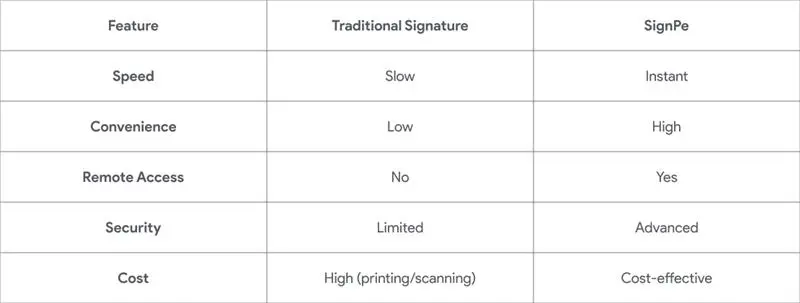
What Makes SignPe Different?
- Simple, intuitive interface
- Works across all major document formats
- Fast setup—start signing in minutes
- Designed for modern workflows
- Scalable for individuals and businesses
Start Signing Smarter Today
In a world where speed matters, your document workflow shouldn’t hold you back.
With SignPe, you can:
- Sign documents in seconds
- Collaborate effortlessly
- Stay secure and compliant
- Eliminate paperwork forever
Get started with SignPe today and transform the way you sign documents.
Frequently Asked Questions
Is a signature on SignPe legally binding?
Yes. SignPe complies with major global electronic signature laws, including the ESIGN Act, UETA, and eIDAS. Every signature carries the same legal weight as a traditional pen-and-paper signature.
Which document formats does SignPe support?
SignPe is format-agnostic. You can upload and sign PDFs, Word documents (DocX), and images (PNG, JPG) without needing to convert them first.
Can I sign documents if I’m offline?
Absolutely. You can review and sign documents without an internet connection. Once your device reconnects, SignPe automatically syncs and sends the signed copies to all relevant parties.
What is an Audit Trail, and why do I need it?
The Audit Trail is a digital log that tracks the document’s history. It records who signed, when they signed (timestamp), and their IP address. This provides a tamper-proof layer of security for legal disputes.
How do I get multiple people to sign one document?
Simply add the email addresses of all required signers. You can use Sequential Routing to decide the exact order in which they receive the document, or allow everyone to sign at once.
What happens if I send a document by mistake?
If the document hasn’t been fully executed, you can use the Void feature. This instantly cancels the request and notifies all parties that the document is no longer valid.
Does SignPe work with my existing cloud storage?
Yes. SignPe integrates directly with Google Drive, OneDrive, and Dropbox, allowing you to pull, sign, and save documents back to your preferred cloud without downloading them to your device.